MarkBernstein.org

A nice note on Tinderbox 4.6 from Clifford Wulfman, Coordinator of Library Digital Initiatives at Princeton.

I want to commend you once again for producing a superior tool. I'm an old-fashioned man in many ways: I like my vintage hypertexts; I like my vintage development environments (emacs, please, and spare me your Eclipses); and over the years I've become an open-source supporter, if not exactly an evangelist.

But Tinderbox is a piece of software I've never regretted buying. I've just spent a most productive day working through some design problems, and the way Tinderbox has allowed me to move seamlessly between visual and textual expression is simply unmatched. I've fallen out of the blogosphere and haven't done anything with exports and agents for a long time, but it looks like all that apparatus has been improved extensively, and I'm looking forward to playing with it soon.

A strength of spatial hypertext tools like the Tinderbox map is that they carry lots of meaning without much formal overhead; you can express that relationships exist without knowing every detail of the relationship.

But a drawback of our current tools for everything from “mind maps” to “information architecture” is that we’ve become tightly focused on boxes and arrows. Boxes are fundamental: you can draw a box around everything. And boxes, used juduciously, avoid chartjunk, the temptation to load up your visualization with lots of symbolic, sentimental clipart.

One weakness of boxes and arrows is their seeming precision: those straight lines tempt us to read meaning into every pixel, and so we wind up tweaking our layouts to get pixel-level alignment and spacing just right. This is literally unnatural: the natural world isn’t like that. An organization is nothing like an org chart, and all those identical neat boxes in the site map tempt us to make each page equivalent when each page could also be precisely what it needs to be in its specific role.

IVICA: Boxes and Arrows
Louis A. Sullivan, A System of Architectural Ornament

We have few tools that work with this sort of textured, layered, organic vocabulary of forms. I think that’s going to be a fruitful direction for research, especially now that we understand spatial parsers and are getting accustomed (as in OpenType fonts) to working with forms that depend on context.

Meagan Timney’s Factory Girls

Want to read more about Meagan Timney’s Tinderbox project for a digital archive of working class Victorian poetry? Here’s the pdf.

Meagan Timney is writing a dissertation "Of Factory Girls and Serving Maids: The Literary Labours of Victorian Working-Class Women in Victorian Britain," at Dalhousie, where she oversees the Working Class Women Poets archive. She recently sent some interesting notes about her work with Tinderbox for planning the archive.

Here’s the treemap view that she sketched for the archive.

Go ahead and click the image; so you can see the full-size window.

There’s nothing very fancy going on here — just a straightforward sketch of the structure of a scholarly site. But it occurs to me that this kind of visualization can be terrifically useful for thinking about all sorts of aspects of site development and planning. And, while you know how things work, this diagram might work well for explaining the site (and not just the front page!) to managers (and funders) who don’t spend much of their time reading this sort of Web site.

Same things with the Common Words view. It’s not a sophisticated analytical tool, but it’s right at your fingertips — and it’s easy to compare the word cloud for a single note or section to the word frequencies of the entire document.

Little Match Girls

Describing the site, Timney writes that "Materials to be mounted on the site include an annotated index of working-class women authors and their works, an extensive critical introduction, a database of more than 600 full-text poems written by working-class women in the nineteenth century (including Fanny Forrester, Marie Joussaye Fotheringham, Mary Hutton, Millicent Langton, Lucy Larcom, and Ruth Wills), a full bibliography of scholarship, reviews, and textual materials that will provide both historical and literary contexts (e.g. reviews from editors in nineteenth-century periodicals, brief biographies of authors, such as Ben Brierley’s biography of Fanny Forrester in Ben Brierley’s Journal), and serve as a portal to contemporary critical contexts. This fully-searchable database will include headnotes and annotations for each poet. Other materials will include a Wiki, which will document the design and editorial practices of the site, to augment the construction of a prototype model for other sites, and a web forum, which will allow for critical discussions of the texts themselves, humanities computing and the digital representation of non- canonical texts, as well as open discussions of hypertext editions and their function as systems of “information engineering” (Flanders)."

Little Match Girls

Have an interesting Tinderbox project? I'd like to hear about it. So would lots of people who read this blog. You might find helpers, advisors, collaborators, and fans. Email me.

Since we’re on the subject of Tinderbox maps, this is a good time to point to Eric Blue’s catalog of 15 Effective Tools for Visual Knowledge Management. Almost everything here is box-and-line, with occasional forays into circle-and-line. But there are some interesting exceptions. (The Tinderbox screen shot is from one of Pamela Taylor’s studies)

Jun 09 10 2009

Born To Kvetch

We were visiting my aunt and uncle, who were renting a house on the Cape. It was breakfast; my aunt was making matzoh brei, as a special treat. My dad loved matzoh brei, which my mom wouldn’t make (because it's traditionally fried in schmaltz and Mom was a low-fat girl with a vengeance). So we were all sitting around, talking politics and eating just a little more matzoh brei, and a close friend of my cousin’s fiancée comes over because he wants some matzoh brei too. He’s a nice guy, a curator for an art museum, full of good stories. And he mentions this book, Born To Kvetch, whch naturally I note down in my iPhone so it can get into my Tinderbox projects file, and onto my reading stack. And now I’m reading it.

The first essays are absolutely terrific, especially the fascinating study of kvetching, “Kvetch Que C’est,” that opens the book. I’d always assumed that kvetching — that familiar style of complaining so familiar to Jews whose ancestors spoke Yiddish — was a 19th century style, but Wex makes a great case that it’s old, perhaps very old. I’d missed, for example, Exodus 14.11, which has a certain familiar ring:

Is it from lack of graves in Egypt that you took us to die in the desert?

Wex argues that kvetching is very close to the center of Jewishness. It’s fascinating. The later chapters of the book tend to bog down in odd facts and curious sayings, but even there we encounter treasures. For example, you probably know schmuck, and putz, and maybe schlong. But what are them feminine equivalents? You never hear them. Wex explains why.

Then there’s lign in dr’erd un bakn beygl — a phrase that explains that things are going so well that you’re dead, you’ve got to spend eternity in a hot kitchen, you’re baking bagels that (being dead) you can’t eat, and since down there everyone is dead it’s really hard to sell them, but thanks for asking. (I’ve never understood why, when people ask “How are you?” I never feel right saying “Great!” This became a regular shtick with Dorie Friend, who was president of Swarthmore when I was a student, because I’d always have some complaint, and then when it became a shtick I’d get myself tangled up to his endless amusement. Now I know that my ancestors thought it was impolite, and possibly dangerous, to say how wonderfully things are going...)

We make Tinderbox maps because spatial relationships can be richer and more flexible than lists.

This argument is distinct from one that is sometimes advanced to support ‘mind mapping’ — that people are more adept at working with spatial relationships than with other symbolic forms. I'm not convinced that people are particularly good at working with spatial relations. But spatial language is inherently richer at expressing some relationships, and the continuity of space is often convenient for describing approximate relationships that are difficult or inconvenient to specify more exactly,

IVICA: Space and Patterns
Tinderbox map by J. Nathan Matias

Here’s a piece actual Tinderbox map, produced for a corporate presentation and discussion. The dialectic pattern here — question and answer, call and response — is something we often encounter in meetings, in negotiation, and in planning. We’re doing this not to validate or verify a logical inference — this isn’t a poor man’s Toulmin diagram — but rather to record the making of a design decision.

It’s easy to see what”s going on here, even if you don’t read every note. Notice, though, that there’s no good HTML markup for this description. You could use <dt> and <dd>, I suppose, but that”s a hack. You could use a bunch of special purpose <div>'s. You could format it as a dialogue, like a screenplay.

Question: what would a green, right-facing tag in the right column mean?

Question: what would a blue, left-facing tag in the right column mean?

I bet you can propose sensible answers to both questions. But you’ve never seen this diagram before, there’s no legend, and I don’t think any of us studied this visual language in school. This is interesting.

  • Jon Buscall discusses Tinderbox maps for note-taking, illustrated by his notes from the recent Disruptive Media conference in Stockholm and for an article in progress on social media.
If you work on a Mac and need a tool to create mindmaps, Tinderbox is excellent. Tinderbox isn’t solely a mind-mapping tool but it’s one of the ways you can use it to take notes and organise your ideas.
For goodness’ sake I didn’t realize that I could make different shapes and all kinds of good stuff with the plain little note boxes in Tinderbox.

One key to the Tinderbox map is simplicity and regularity. It’s a working tool for getting things done, not a presentation system for making fancy slides.

Ironically, as Robert Brook pointed out at Tinderbox Weekend London, this can make Tinderbox especially effective in presentations. Not only can you get lots of information in front of management this way, but when a manager say, ‘That’s in the wrong place!’ you can just drag it into a new place and astonish everyone.

But it’s important for Tinderbox maps to be able to express all sorts of relationships and conjectures. That’s why maps are (sometimes) better than lists or database tables: sometimes, you need to express tentative connections or speculative relationships, things to which that you can’t yet commit.

In addition, Tinderbox agents constantly work to find things, and often they express their results through visual characteristics. For example, an agent that searches for overdue tasks might color them red. Tinderbox provides lots of visual dimensions:

  • Color
  • Accent color
  • Shape
  • Height and Width
  • Border style, thickness, and color
  • Shadow size, blur, and color
  • Label font, boldness, size, and color
  • Badge icon

This gives you lots of ways to call attention to particular notes, especially when you have lots of notes in your map. Here’s a study I did one afternoon, while stuck on a crowded airplane, looking at all the books I’ve read in the last few years.

IVICA: visual dimensions in Tinderbox

Here, I just threw all the books into a map, zoomed out, and started a rough sort into whatever clusters made sense at the moment. (Information Architects do a lot of card sorting; it can be a terrific way to discover new ways to structure confusing information.)

And here’s Julie Tolmie’s famous Tinderbox map of patterns in game design:

IVICA: visual dimensions in Tinderbox
Tinderbox map by Julie Tolmie

Note especially the subtle, systematic use of color not merely as an alarm code but as a continuous contextual cue.

Adornments also help structure the space of each Tinderbox map.

IVICA: visual dimensions in Tinderbox
Tinderbox map of psychiatric forensic workflow by Dr. Fionnbar Lenihan

In short, we can say lots of things with Tinderbox maps. But there’s a lot that’s tricky to express, especially when we’re using the maps to jot down information that we don’t yet fully understand. For example:

  • Conference liveblogging
  • Library research notes
  • Collaborative brainstorming
  • Workgroup prioritization, project triage, and scheduling

Today, while we can distinguish exceptional elements in lots of ways, it's harder to express connections between things. We can

  • link them
  • place them next to each other
  • pile them on the same adornment.

That’s better than nothing — and better than squeezing everything into an outline or a list. But I think we can do more.

IVICA: visual dimensions in Tinderbox
Concept proposal. These notes aren’t linked, but their visual connection is stronger than simple adjacency.
Jun 09 7 2009

IVICA: the leaf

On June 19, the researchers who study spatial hypertext and related areas will hold their grand, irregular festival, IVICA. (I sha’n’t be gone long. — You come too. It’s one day, and not very expensive. It’s colocated with Digital Libraries, but you needn’t sign up for the whole conference.)

I didn’t have a paper to send this year, and so the organizers invited me open the shebang. I’m going to say a few words about the day when “A Narrative, a Picture, and a Link Walk Into a Bar”.

I’d like to take a piece of that argument and explore it here. First, because it has interesting implications for Tinderbox and for the way we use Tinderbox maps — especially for information gardening. Second, because it raises interesting questions for all kinds of interface design, from operating systems to preference dialogs.

IVICA: the leaf
Tinderbox map by Prof. Margaret Syveron, University of Texas at Austin

Our information maps are, chiefly, boxes and arrows. When screens were very small, we had no choice. With only 512x384 monochrome pixels , every bit of screen real estate mattered terribly. Every pixel still matters, and we certainly cannot waste them, but perhaps we now have enough cushion to consider a broader views.

IVICA: the leaf

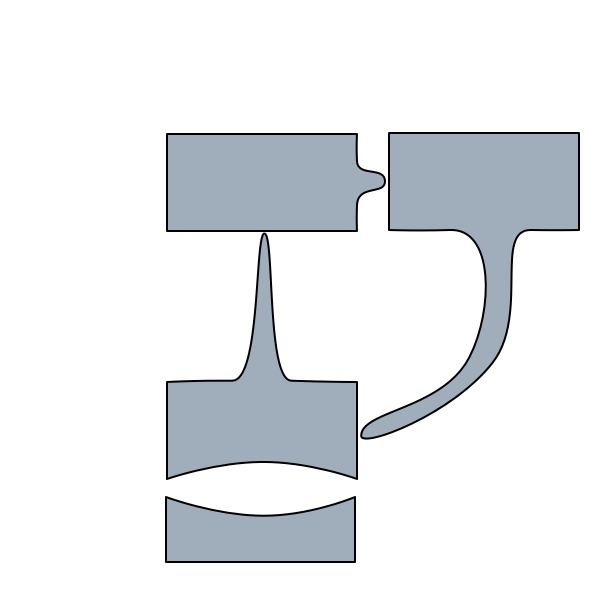
Why use a box, for example, and not (say) a leaf? Boxes use space efficiently, and they’re easy to draw, and at some level of abstraction everything is a box. But then, at some level of abstraction, everything is a curve. How might information farming and information gardening benefit if we moved beyond boxes and lines?

The peril, of course, is chart junk — decorating our maps to make them look good or to impress (or baffle) managers. That’s always a mistake, though it sometimes seems an effective short-term strategy.

Can we make our maps more meaningful? More expressive? Can we perhaps make it more likely that an unconscious or accidental juxtaposition of ideas on the map will trigger reflection and understanding — what Nakakoji and Yamamoto call “representational talkback?”


Twitter: #ivica, #infoFarming

One reason you haven’t seen much here is that I’ve been spending many, many hours lately revamping STime and DateTranslator and their sisters and their cousins and their aunts. All these Tinderbox classes deal with generalized dates and times, and none of this was on the development blueprint. A small issue (handling a new Canadian system format) became a larger issue, and that blossomed into a performance problem.

And, naturally, problems lead to opportunities, and the upshot looks like we’ll see a real performance boost for Tinderbox agents and rules.

But, in the meantime, brother, can you spare a week?

May 09 28 2009

Emphasis

A nice note in Wireframes on ways to convey emphasis in sketches. The same techniques apply in Tinderbox maps and finished Web pages, of course.

One highlight of Tinderbox Weekend London was Robert Brook’s discussion of using Tinderbox for planning public information programs for the British Parliament.

A key theme of his talk was the importance of sketches — small, quickly-prepared documents that hold the information you need yet remain malleable enough to adapt quickly as changes are required. “People often make oil paintings when they want sketches,” Brook observed.

For example, consider the meeting agenda prepared for a series of meetings with the varied stakeholders of a project. Instead of printing numerous agendas tailored for each different audience and constituency, a single Tinderbox agenda can let each meeting focus on its chief concerns through natural actions in hiding, showing, and arranging elements. Map views let participants see what they’re discussing and what is being passed over; people suddenly notice that this thing over here actually connects to the other group’s thing over there.

This flexibility extends from Web projects like Hansard, a new Web repository of Parliamentary debates from 1803 that was partially prototyped with Tinderbox, to performance reviews and management negotiations. In budget discussions, for example, it can be helpful to make note sizes proportional to cost, focusing attention on the most pertinent items.

My own notes for this fascinating session are something of a mess, highlighting Brook’s own observations of the importance of informal and even fuzzy tools. Keeping control and responsibility in one place, he insists, is key: being able to change the map within a presentation gives speakers a way to visibly incorporate changes and address objections that is indispensable where many interests must be satisfied and where changes will need to be accommodate and embraced throughout the entire development cycle.

My question about legal applications of Tinderbox garnered all sorts of interesting mail, from Vancouver the north woods of British Columbia to Kathmandu. Everything from teaching police officers to be better witnesses to mapping lines of influence in the Afghan resistance to the Soviet Union.

Forensic psychiatrist Dr. Fionnbar Lenihan writes from Edinburgh that he found Tinderbox "good for doing some quick pandemic flu planning." He’s the pandemic czar at his facility; closed communities like prisons are particularly worrisome for managing disease outbreaks.

Once I had sketched out some ideas on a map, I was able to print off a view and use that for discussions with other people.

This is an example of a “disposable Tinderbox” — a Tinderbox project that’s intended as a sketch or study rather than a long, ongoing project. Tinderbox serves its role in the early stages, where its flexibility and responsiveness help capture ideas without premature commitment to an organization or framework or conclusion. It’s easy, for example, to accommodate information in Tinderbox that “doesn’t seem to fit”, or ideas that might not fit with the expected result. Later, you can pick up and move to Keynote or InDesign or whatever you want to use for production; Tinderbox now serves as a storehouse of information from which you can draw.

I’d like to understand better the ways people are using Tinderbox in legal work— including thing like law school notes, police work, investigative reporting, litigation support, forensics, legal scholarship, and corrections. If you’re involved in any of these areas (or anything else pertinent), I’d love to hear from you — either post on the Tinderbox forum or Email me..

Apr 09 8 2009

Dashboard Clock

Dashboard Clock

My dad always said that the dashboard clock was the first thing that would break in a new car, because nobody needs a dashboard clock. Everything — placing the numbers, setting the color as the time of day changes — is done in a rule. For the moment, I’m leaving this as an exercise for the reader.

This isn't really meant for use; it's a folly or a fantasia. But it is a working clock.

Do you have a better way to do this? Or another nifty idea for a folly? Email me.